
AI video editing in Premiere Pro: what actually works in 2026
A plain-English breakdown of MCP connectors, Premiere Pro AI plugins, Claude transcript editing, music-video rough cuts, event recap editing, real limits, and costs.

“Can Claude edit my video?” sounds like one question, but it usually mixes together three different things: asking a chatbot for advice, connecting an AI assistant to software, and using a Premiere Pro plugin that can put real changes on a timeline.
The November 8 tutorial tests that confusion directly. This article separates what worked in the recorded demo from what still took manual editing, so you can choose a tool based on the footage in front of you instead of the word “AI.”
Quick Answer
AI video editing works best in Premiere Pro when a tool has a specific job: cut dialogue from a transcript, remove silence, switch podcast cameras, build music-video performance cuts, or make event selects. It does not replace the editor who judges story, performance, timing, sound, color, and delivery.
Video walkthrough
AI Video Editing in Premiere Pro: What Actually Works in 2026
Watch this walkthrough to see the steps in Premiere Pro, then compare the demonstrated settings and results with your own footage before applying them to a full project.
Watch AI Video Editing in Premiere Pro: What Actually Works in 2026 on YouTube
1. There are three different levels of AI video editing
| Method | What it can do | What it cannot do alone |
|---|---|---|
| Claude or ChatGPT conversation | Read text, suggest cuts, outline a story, write edit notes | See the active Premiere sequence or apply timeline changes |
| MCP or app connector | Let an AI assistant call tools exposed by a supported app | Control every Premiere Pro function unless a real connector exposes it |
| Premiere Pro AI plugin | Run a defined editing task and return an editable sequence | Make every creative decision or guarantee a finished cut |
What is AutoEdit?
See how AutoEdit handles repetitive editing work inside Premiere Pro while keeping the resulting timeline editable.
2. Why an MCP connector is not automatically a Premiere Pro editor
An MCP connector gives an AI assistant access to tools another app exposes. That can be useful, but it is not the same as Claude magically seeing every frame and clicking every Premiere command.
In the recorded November 8 test, the available connector route was not a complete replacement for a Premiere Pro edit. The video’s conclusion was simple: if the setup and file passing take longer than the edit, the connector is not saving time yet. Check the current supported apps before building a client job around any connector.
3. What worked for talking-head and creator videos
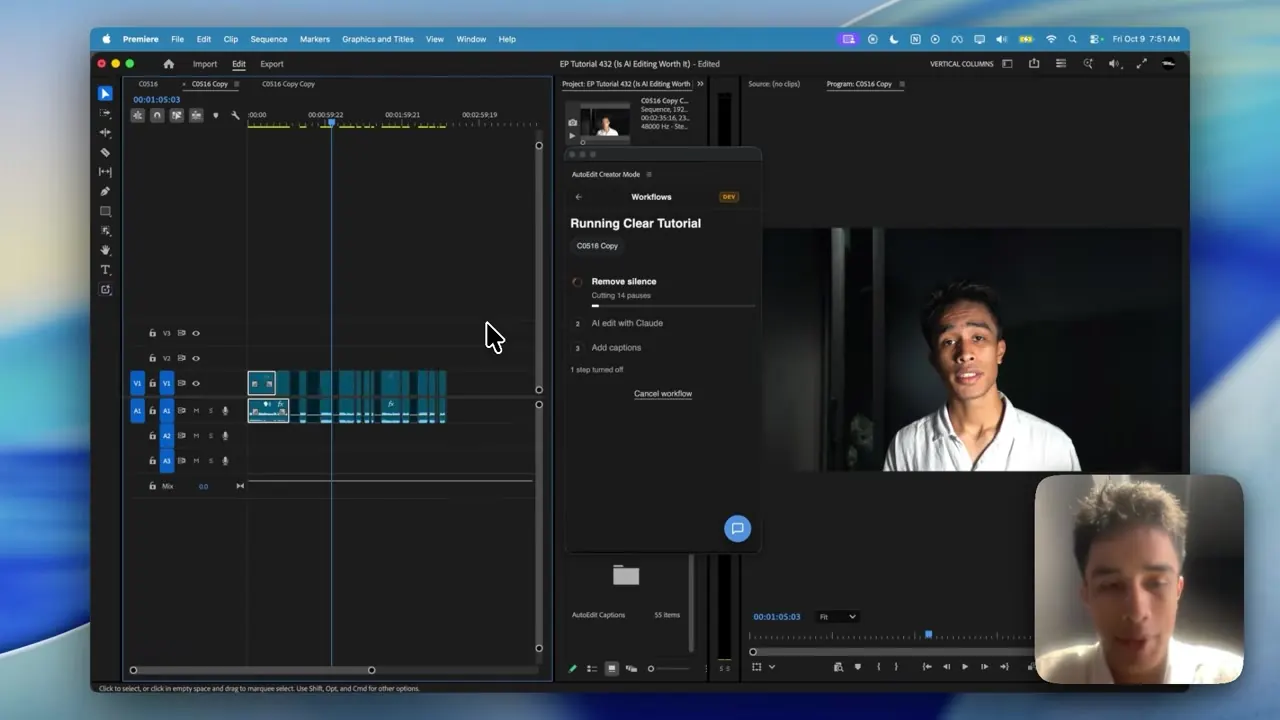
AutoEdit Creator Mode ran inside Premiere Pro. The demonstrated sequence removed silences, sent the spoken content through Claude, presented bad-take and repeat decisions for review, applied the approved cuts, and added captions afterward.
That is useful for YouTube videos, tutorials, interviews, and podcasts where the words drive the structure. It is less useful for a silent montage where the strongest take depends on facial expression, camera movement, or music alone.
4. What worked for music-video footage
AutoEdit Music Video Mode used the song, full performance takes, and B-roll. It stacked the footage, helped prepare the synchronized performances, detected BPM, switched between takes, and placed B-roll and selected effects on an editable timeline.
The first cut still needed a music-video editor. Weak performance choices had to be replaced, lip sync checked, effects reduced or changed, and the strongest visual moments moved to the right part of the song.
5. What worked for event recap footage
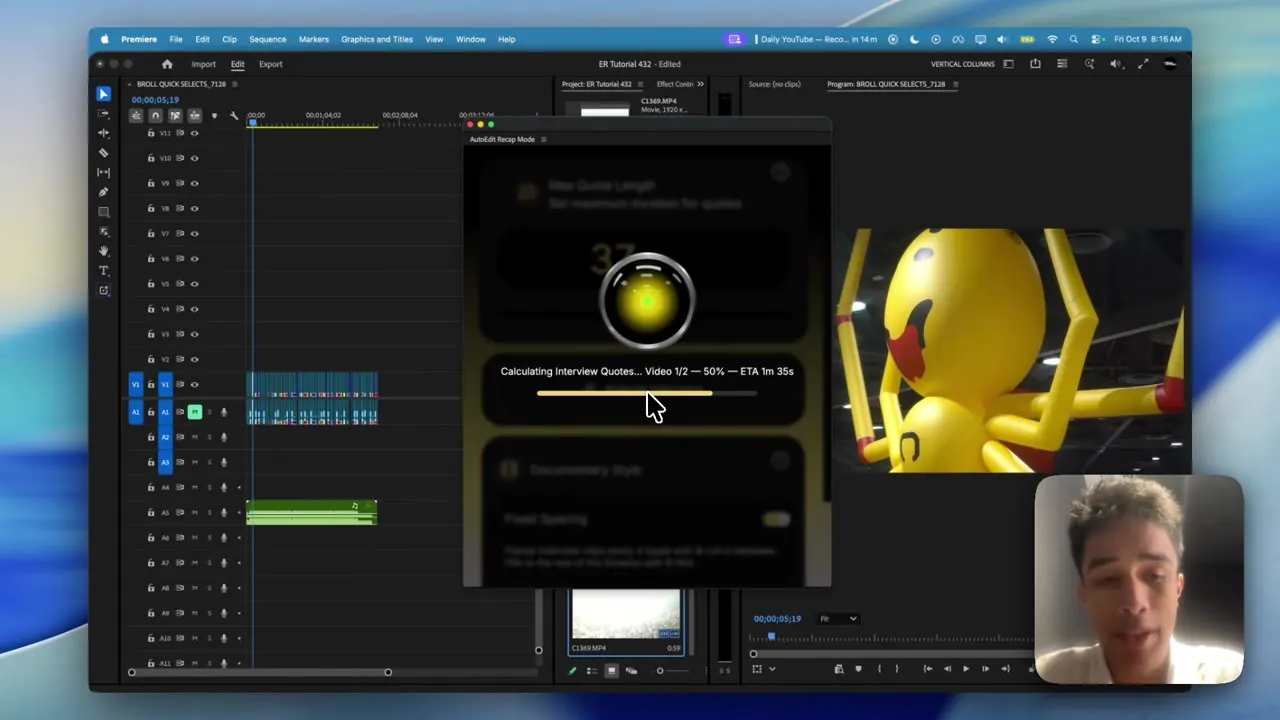
AutoEdit Event Recap Mode used a music track, event B-roll, and optional interviews. The recorded demo pulled short interview highlights and placed B-roll around them to create a starting recap sequence.
This can save the first long pass through interview footage, but the editor still checks whether the quote represents the speaker accurately, whether the B-roll matches the moment, and whether the client’s most important people or locations appear.
6. When is an AI editing plugin worth paying for?
Measure the whole job. Count setup time, processing time, correction time, and the final review. A tool that creates a first cut in five minutes but takes an hour to repair is not a five-minute edit.
The value is easier to see when you repeat the same task every week: cutting long creator recordings, syncing performance takes, finding interview quotes, or building event B-roll selects. If you only make one video every few months, a manual pass may be simpler.
- Use Creator Mode when spoken content drives the edit.
- Use Music Video Mode when the song and full performances drive the edit.
- Use Event Recap Mode for event B-roll plus optional interviews.
- Keep the source sequence and review every result.
Tips
- Test the first pass on a duplicate sequence.
- Watch the complete result before sending it to a client or publishing it.
- Save the settings that worked for the next video in the same series.
Common mistakes
- Treating an automatic first cut like a finished video.
- Adding effects before the basic cut is easy to follow.
- Skipping the audio, caption, and export check at the end.
Try the workflow
Free tools for this article
Use the most relevant free tool for the task, then continue with the rest of your edit.
Continue in Premiere Pro
Find the Right AutoEdit Plugin
Build an editable starting point, then keep creative control of the timeline.
Find the Right AutoEdit PluginFrequently asked questions
Can Claude AI directly edit in Premiere Pro?
Claude needs an integration that exposes specific editing actions. AutoEdit Creator Mode brings Claude transcript analysis into Premiere Pro and turns approved decisions into timeline cuts. A normal Claude browser chat does not directly edit the open sequence.
What is the difference between MCP and a Premiere Pro plugin?
MCP is a connection standard that lets an AI call tools an app exposes. A Premiere Pro plugin is installed in Premiere and is built to perform specific editing jobs on the project or sequence.
Will AI replace video editors?
The tools shown here handle defined first-pass jobs. Editors still judge the story, performance, shot choice, timing, sound, color, accuracy, client notes, and final export.
What is the best footage for automatic video editing?
Clear spoken footage works well for transcript editing. Full-song performance takes work for music-video assembly. Organized event B-roll and interviews work for event recap first cuts. Match the tool to the footage.
Sources and verification
External product claims were checked against these first-party sources.
The complete AI video editing breakdown is Devin Huynh’s recorded comparison of connectors and Premiere Pro plugins used throughout this article.
AutoEdit Creator Mode is the tracked product page for the creator-video plugin shown in the test.