
What Claude Can—and Cannot—Do in Premiere Pro
A straight Premiere Pro guide for editors who want to evaluate the practical editing tasks Claude can assist with in Premiere Pro, with the actual plugin, timeline, and cuts explained in plain English.

What Claude Can—and Cannot—Do in Premiere Pro
AI-assisted workflows inside Premiere ProMost people asking about premiere pro claude are not looking for another chatbot. They want to know whether Claude can put real cuts on a Premiere Pro timeline.
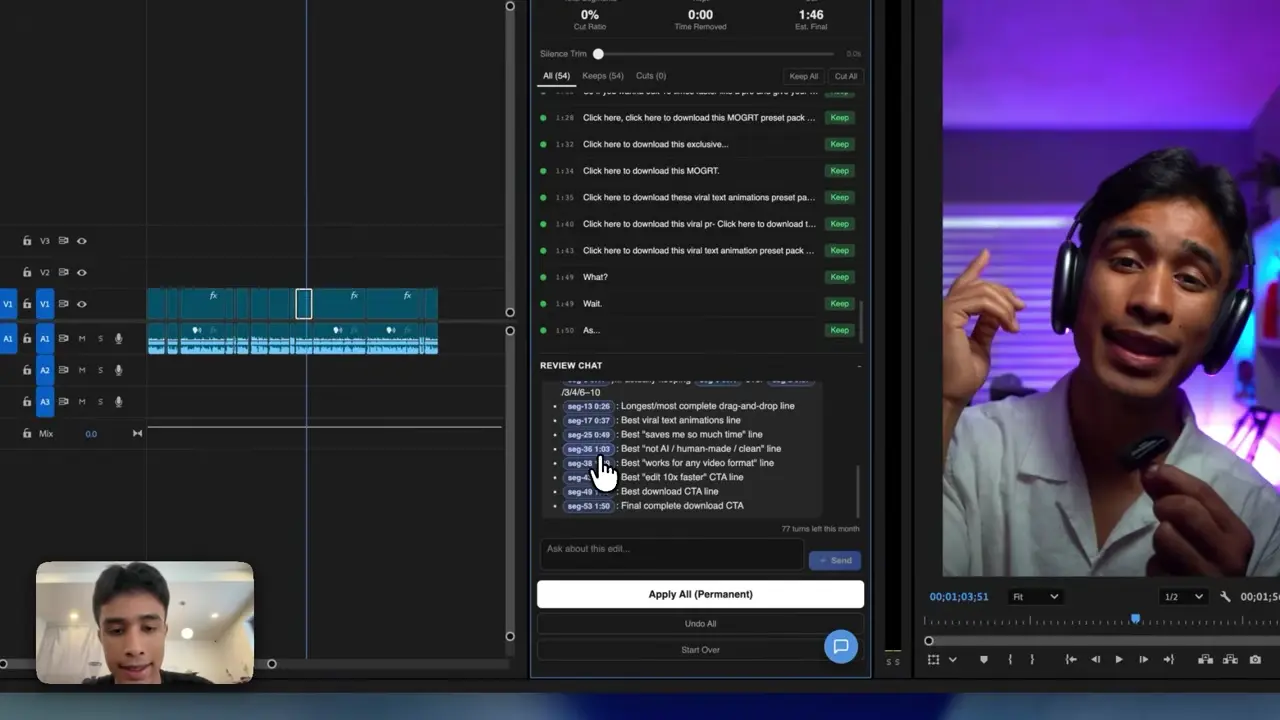
The easiest way to think about it is this: Claude is the handyman and Premiere Pro has the tools. AutoEdit brings Claude into Premiere, so it can read the transcript, help with the rough cut, and leave you with a normal timeline you can keep editing.
Quick Answer
Claude AI in Premiere Pro is most useful for transcript reasoning: identifying repeated sentences, restarts, filler words, weak takes, and sections that answer a specific prompt. Through AutoEdit Creator Mode, those decisions can become a reviewable rough cut. Final visuals, timing, sound, color, and delivery remain editorial work.
Can Claude understand a Premiere Pro project?
Claude reads the transcript and the instructions passed to it by the plugin. Think of Claude as the handyman and Premiere Pro as the toolbox: Claude can use the tools AutoEdit gives it, but it cannot guess every creative choice in your head.
Which Premiere Pro editing tasks fit Claude best?
- Repeated-sentence detection
- Restart and bad-take review
- Selected filler-word cleanup
- Topic and answer extraction
- Transcript-led rough-cut planning
- Decision explanations the editor can inspect
How does Claude help build a rough cut?
The editor gives Claude a specific goal, reviews the transcript segments it identifies, and applies approved changes to a duplicate sequence. This converts language reasoning into a practical first assembly without hiding the edit from the user.
What does Creator Mode add beyond Claude?
Creator Mode puts Chat Edit beside separate tools for silence removal, captions, podcast camera switching, audio cleanup, and motion graphics. You use the tool that matches the next job on the timeline.
Where are Claude’s editing boundaries?
- Silent montage and purely visual storytelling
- Precise music-beat cutting when dialogue is not the structure
- Final color matching and sound mixing
- Legal, factual, rights, and brand approval
- Unattended delivery of a finished video
When should you use Claude in Premiere Pro?
Use Claude when most of the edit depends on what people say: talking-head videos, tutorials, interviews, and podcasts. For music videos or event recaps, start with the AutoEdit mode made for that footage.
Tips
- Work on a duplicate sequence.
- Ask for one clear edit at a time.
- Watch the cut and count how much you actually have to fix.
Common mistakes
- Treating the rough draft like a finished edit.
- Using transcript tools on clips that need visual selects.
- Exporting without watching every automatic cut.
Try the workflow
Free tools for this article
Use the most relevant free tool for the task, then continue with the rest of your edit.
 Free Podcast Name GeneratorGenerate podcast-name directions that fit the topic, host, and audience.
Video walkthrough
How to Use Claude AI to Automatically Edit in Premiere Pro
Continue in Premiere Pro
Explore AutoEdit Creator Mode
Build an editable starting point, then keep creative control of the timeline.
Explore AutoEdit Creator ModeFrequently asked questions
What can Claude do in Premiere Pro?
Claude can assist with transcript analysis, repeated-take review, filler-word decisions, topic extraction, and dialogue rough-cut planning through an integration.
Can Claude see every video frame?
Claude mainly works from the transcript and the information AutoEdit passes to it. You still make the final visual calls in Premiere Pro.
Can Claude edit a podcast?
Yes. Claude can clean the spoken edit, and Creator Mode also supports podcast camera switching for as many as three cameras.
Can Claude add captions in Premiere Pro?
Yes. AutoEdit includes Caption Applier inside Premiere Pro, where you can generate captions and set the font, colors, outline, position, and active-word style.
Is Claude useful for music videos?
Claude is strongest when there is useful dialogue to read. For songs, performance takes, and beat cuts, use AutoEdit Music Video Mode.
Sources and verification
External product claims were checked against these first-party sources.
How to Use Claude AI to Automatically Edit in Premiere Pro demonstrates Claude-powered editing inside a working Premiere Pro project.
AutoEdit Creator Mode provides the current Creator Mode download and product details.
Adobe Premiere Pro Text-Based Editing documents Adobe’s native transcript-based editing features.