
Can Claude Actually Edit a Premiere Pro Timeline?
A straight Premiere Pro guide for editors who want to understand whether Claude can make real timeline edits instead of only discussing them, with the actual plugin, timeline, and cuts explained in plain English.

Can Claude Actually Edit a Premiere Pro Timeline?
AI-assisted workflows inside Premiere ProMost people asking about can claude edit in premiere pro are not looking for another chatbot. They want to know whether Claude can put real cuts on a Premiere Pro timeline.
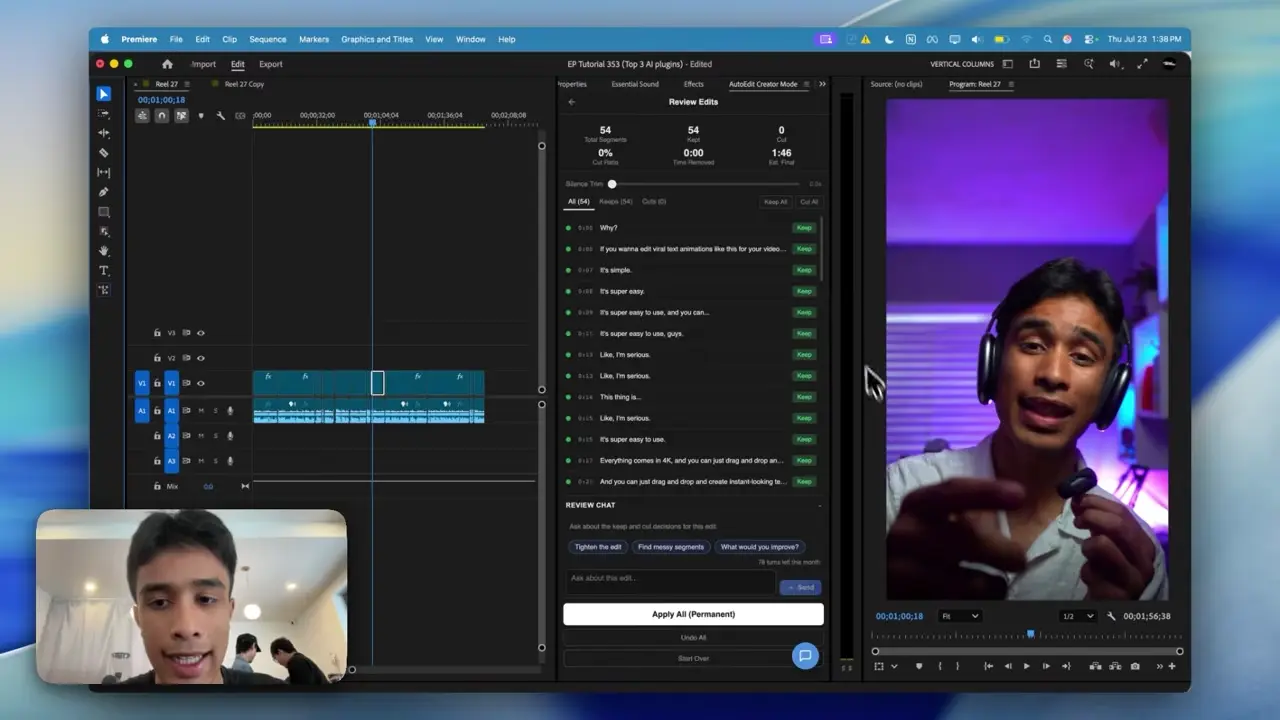
The easiest way to think about it is this: Claude is the handyman and Premiere Pro has the tools. AutoEdit brings Claude into Premiere, so it can read the transcript, help with the rough cut, and leave you with a normal timeline you can keep editing.
Quick Answer
Claude can help edit videos in Premiere Pro when it is connected through an editing integration. AutoEdit Creator Mode lets Claude analyze dialogue, flag bad or repeated takes, and propose transcript-based cuts that can be applied to an editable sequence. Claude alone does not independently finish every visual and creative decision.
Can Claude actually change a Premiere Pro timeline?
Yes, through an integration that translates Claude’s analysis into Premiere Pro actions. AutoEdit Creator Mode demonstrates this with transcript segments that the editor can preview, keep, cut, and apply to a sequence.
What can Claude do without a Premiere Pro plugin?
- Suggest an edit structure from pasted text
- Rewrite or summarize a transcript
- Create paper-edit notes
- Draft prompts, titles, chapters, or captions
- Explain Premiere Pro techniques
What changes when Claude uses an editing integration?
- Analysis is tied to selected spoken footage.
- Decisions can reference actual transcript segments.
- The editor can preview proposed cuts.
- Approved decisions can modify a duplicate Premiere Pro sequence.
- The result stays available for normal timeline refinement.
What can Claude edit automatically?
Inside AutoEdit, Claude can find repeated lines, bad takes, restarts, filler words, and sections that match your prompt. It can then put those cuts on a duplicate Premiere Pro sequence. That gives you a rough draft, not a finished upload.
What can Claude not reliably finish by itself?
- Final performance judgment
- Shot-by-shot visual continuity
- Context-aware meme or B-roll selection for every niche
- Final color and audio mixing
- Rights, facts, client notes, and delivery checks
How should you test Claude as a video editor?
Give it a five-minute duplicate sequence with repeated takes and clear dialogue. Track the time needed to generate, correct, and finish the cut. Compare that total with your normal manual workflow.
Tips
- Work on a duplicate sequence.
- Ask for one clear edit at a time.
- Watch the cut and count how much you actually have to fix.
Common mistakes
- Treating the rough draft like a finished edit.
- Using transcript tools on clips that need visual selects.
- Exporting without watching every automatic cut.
Try the workflow
Free tools for this article
Use the most relevant free tool for the task, then continue with the rest of your edit.
Video walkthrough
How to Use Claude AI to Automatically Edit in Premiere Pro
Continue in Premiere Pro
Explore AutoEdit Creator Mode
Build an editable starting point, then keep creative control of the timeline.
Explore AutoEdit Creator ModeFrequently asked questions
Can Claude edit automatically?
Yes. Through AutoEdit, Claude can turn transcript decisions into cuts on a Premiere Pro sequence. Treat the result as a rough draft and review it before finishing the video.
Is Claude a standalone video editor?
Claude is not a conventional nonlinear editor. It needs an editing application and integration to turn analysis into timeline changes.
Can Claude remove bad takes?
Claude can identify likely weak, repeated, or restarted spoken takes. The editor should preview performance and context before applying cuts.
Can Claude add B-roll automatically?
Creator Mode can help place B-roll, but you should still check whether each shot matches what is being said and lands at the right moment.
Does Claude replace Premiere Pro?
No. Premiere Pro remains the editing environment; Claude assists with analysis and defined repetitive tasks.
Sources and verification
External product claims were checked against these first-party sources.
How to Use Claude AI to Automatically Edit in Premiere Pro demonstrates Claude-powered editing inside a working Premiere Pro project.
AutoEdit Creator Mode provides the current Creator Mode download and product details.
Adobe Premiere Pro Text-Based Editing documents Adobe’s native transcript-based editing features.