
Best AI Tools for Video Editors in 2026
An analytical comparison of the leading AI tools for editing, captions, voice, motion graphics, sound design, color, images, music, sound effects, and transcription.

Best AI Tools for Video Editors in 2026
AI-assisted workflows inside Premiere ProAudience: Professional video editors, creators, post-production teams, agencies, and in-house content departments.
Artificial intelligence now touches nearly every stage of video production: transcript-based rough cuts, multicamera switching, captions, voiceovers, dialogue repair, motion design, generative B-roll, image creation, music, sound effects, restoration, color workflows, and final delivery.
Quick Answer
No single product is best at all of those tasks. The strongest setup is usually a primary nonlinear editor supplemented by specialized AI tools. Adobe Premiere Pro with Firefly offers the broadest integrated ecosystem; DaVinci Resolve Studio delivers the strongest all-in-one editing, color, audio, and local-processing value; AutoEdit is the most focused option for Claude-powered talking-head rough cuts inside Premiere Pro; Runway leads in generative video; ElevenLabs leads in voice and AI audio; Descript remains especially effective for transcript-first editing; and Topaz Video is the specialist for restoration and upscaling.
Executive Summary
For professional editors who want one primary platform, Adobe Premiere Pro with Firefly ranks first overall. Premiere combines conventional timeline editing with Text-Based Editing, Media Intelligence, captions, AI masking, color tools, Firefly-powered Generative Extend, and access to Adobe and partner image, video, and audio models. Adobe’s Firefly environment now spans image, video, sound-effect, soundtrack, and design workflows, while Premiere remains the final editorial environment.
DaVinci Resolve Studio is the best value for editors who want an integrated professional system with editing, Fusion motion graphics, Fairlight audio, industry-leading color tools, transcription, voice isolation, dialogue separation, music remixing, masking, and AI-assisted speech generation. Resolve Studio is available for macOS, Windows, and Linux for a one-time $295 purchase, while the free edition is unusually capable.
AutoEdit Creator Mode is the best specialized AI tool for Premiere-based talking-head editors. It uses Claude to analyze a transcript, decide what should stay or be removed, and build a reviewable rough cut without moving the project outside Premiere Pro. It is particularly suited to YouTube videos, tutorials, product demonstrations, webinars, podcast clips, and social content containing spoken dialogue.
Runway is the strongest generative-video specialist for creating or transforming shots, concept footage, transitions, VFX elements, and synthetic B-roll. Its current model lineup includes Gen-4.5 as well as routed third-party models, but its credit-based workflow is best treated as an asset-generation layer rather than a replacement for a full NLE.
ElevenLabs is the strongest voice and AI-audio platform. It covers expressive text-to-speech, voice cloning, speech-to-speech, dubbing, transcription, music, sound effects, voice isolation, and timeline-based audio production through ElevenLabs Studio. Its public model catalog includes Eleven v3, Multilingual v2, Flash v2.5, Scribe v2, and Eleven Music.
Descript is best for transcript-first video, podcasts, and collaborative rough cuts, while Topaz Video is best for image-quality recovery, denoising, interpolation, stabilization, and upscaling. CapCut remains a practical social-first option, ChatGPT is most useful for ideation and image creation, Claude is strongest as an editorial reasoning assistant, and Suno is a specialist for original AI-generated music.
Creative-control disclaimer: AI systems are production tools, not creative replacements. They can accelerate repetitive work, but they can also select the wrong take, invent visual details, mistranscribe speech, create continuity errors, flatten intentional pacing, or generate material with unclear rights implications. Prompting, reference selection, verification, rights clearance, and editorial review are professional skills, not optional cleanup steps.
Methodology
This guide was researched and verified on August 5, 2026. Official product pages, documentation, pricing pages, support articles, model directories, and changelogs were prioritized. Vendor claims about speed, quality, safety, or commercial suitability were treated as claims rather than independent benchmark results. Secondary sources were only considered where official pages lacked necessary detail.
The editorial score uses five weighted criteria:
The ranking reflects broad utility to professional video editors, not which company has the most advanced model in isolation. A specialist may therefore be the best purchase for a particular task even when it appears below a full production ecosystem.
Pricing is shown in U.S. dollars where official U.S. pricing was available. Annual-plan prices are usually displayed as monthly equivalents and may require a full-year commitment. Taxes, regional pricing, credits, promotions, and feature limits can change.
| Criterion | Weight | What was evaluated |
|---|---|---|
| Real production time saved | 25% | Whether the tool removes substantial repetitive work rather than adding another review layer |
| Integration and workflow fit | 20% | NLE integration, round-tripping, editability, platform support, and team workflow |
| Accuracy and output quality | 20% | Transcript accuracy, visual consistency, voice quality, restoration quality, and control |
| Editorial control | 15% | Reviewability, timeline editability, masking, prompting, versioning, and reversibility |
| Cost, privacy, and deployment | 20% | Free access, subscription burden, local processing, cloud dependence, licensing, and enterprise controls |
Ranked Comparison
The most important interpretation is that rank does not equal suitability for every job. AutoEdit can be a better purchase than Adobe Firefly for a YouTuber who already owns Premiere and spends most of the week removing retakes. ElevenLabs can be more valuable than every higher-ranked product for a localization studio. Topaz can save an archival editor more time than any generative-video platform.
| Rank | Tool | Editorial score | Best category | Primary workflow | One-line verdict |
|---|---|---|---|---|---|
| 1 | Adobe Premiere Pro and Firefly | 93/100 | Best overall ecosystem | Premiere desktop plus Firefly web and integrated generative features | The broadest professional combination of editing, captions, color, masking, generative media, and delivery |
| 2 | DaVinci Resolve Studio | 91/100 | Best all-in-one value | Native desktop NLE on macOS, Windows, and Linux | The strongest single-purchase package for editing, color, audio, motion graphics, and local AI |
| 3 | AutoEdit Creator Mode | 88/100 | Best talking-head rough cuts | Native Premiere Pro extension on macOS and Windows | The most focused Claude-powered first-pass editor for spoken creator footage |
| 4 | Runway | 86/100 | Best generative video | Browser and API-based asset generation | The best specialist for generating, transforming, and prototyping visual shots |
| 5 | ElevenLabs | 84/100 | Best voice and AI audio | Browser, Studio, and API | The deepest combined platform for voiceovers, cloning, dubbing, transcription, music, and SFX |
| 6 | Descript | 82/100 | Best transcript-first editor | Desktop and web | The easiest route from transcript to podcast, interview, or creator video |
| 7 | Topaz Video | 80/100 | Best restoration and upscaling | Local desktop processing with optional cloud rendering | The specialist to use when source-image quality, not editorial assembly, is the bottleneck |
| 8 | CapCut | 77/100 | Best social-first editor | Desktop, browser, and mobile | Fast and accessible for vertical content, captions, templates, and creator automation |
| 9 | ChatGPT | 75/100 | Best ideation and image assistant | Web, desktop, and mobile | Excellent for concepts, scripts, shot lists, image generation, analysis, and production support, not timeline editing |
| 10 | Claude | 73/100 | Best transcript and story analysis | Web and cross-platform apps; Premiere access through AutoEdit | A strong editorial reasoning partner whose direct media-generation capabilities remain intentionally limited |
| 11 | Suno | 71/100 | Best dedicated AI music generator | Browser-first music generation | A powerful music specialist, but not a broader post-production platform |
Category Coverage, Pricing, and Best Uses
The following feature matrix distinguishes between a core capability, a secondary or supporting capability, and a category the product does not meaningfully serve.
Legend: ● Core capability, ◐ Secondary or limited capability, - Not a meaningful native capability
Claude’s editing and transcription marks refer to reasoning over supplied transcripts, scripts, documents, and visual references, not native timeline editing or standalone audio transcription. Through AutoEdit, Claude can contribute directly to Premiere Pro rough-cut decisions.
| Tool | Editing | Captions | Voice | Motion graphics / generative motion | Sound design | Color | Image generation | Music | SFX | Transcription |
|---|---|---|---|---|---|---|---|---|---|---|
| Adobe Premiere Pro and Firefly | ● | ● | ◐ | ● | ● | ● | ● | ● | ● | ● |
| DaVinci Resolve Studio | ● | ● | ● | ● | ● | ● | - | ◐ | ◐ | ● |
| AutoEdit Creator Mode | ● | ● | - | ◐ | ◐ | - | - | ◐ | ● | ● |
| Runway | ◐ | - | ◐ | ● | ◐ | - | ● | ◐ | ● | - |
| ElevenLabs | ◐ | ● | ● | - | ● | - | ◐ | ● | ● | ● |
| Descript | ● | ● | ● | ◐ | ● | - | ◐ | ◐ | ◐ | ● |
| Topaz Video | ◐ | - | - | - | - | ◐ | - | - | - | - |
| CapCut | ● | ● | ● | ◐ | ◐ | ◐ | ◐ | ◐ | ◐ | ● |
| ChatGPT | - | - | ◐ | - | ◐ | - | ● | - | - | ◐ |
| Claude | ◐ | - | - | - | - | - | - | - | - | ◐ |
| Suno | - | - | - | - | - | - | - | ● | - | - |
Pricing comparison
| Tool | Free access | Representative paid pricing | Licensing model | Platform and integration notes |
|---|---|---|---|---|
| Adobe Premiere Pro and Firefly | Trials and limited Firefly access vary | Premiere is listed at $33.99/month; Firefly Standard at $9.99/month and Pro at $19.99/month | Subscription and generative-credit model | Premiere runs on macOS and Windows; Firefly is web-based and selected Firefly functions appear inside Adobe apps. |
| DaVinci Resolve | Full free edition | Resolve Studio is $295 one time | Perpetual desktop license | macOS, Windows, and Linux; editing, Fusion, color, Fairlight, and delivery are integrated in one project. |
| AutoEdit | Free tier with timeline utilities | Lite from $7.99/month billed annually; Creator from $23.99/month billed annually; higher Pro limits available | Subscription with usage limits; free utilities | Native Premiere Pro extension for macOS and Windows. The free tier includes utilities such as silence cutting, image pasting, SFX, and motion graphics; Claude editing requires a paid tier. |
| Runway | 125 one-time free credits | Standard from $12/month annually; Pro from $28/month annually; higher-credit plans available | Credit-based subscription and API usage | Browser and API; Gen-4.5 costs 12 credits per generated second through the API. |
| ElevenLabs | 10,000 monthly credits on Free | Starter $6/month; Creator has a $22/month list price; higher tiers and API metering available | Credit subscription and usage-based API | Browser, Studio, and API; commercial licensing begins on eligible paid tiers. |
| Descript | Free plan | Hobbyist from $16/month annually; Creator from $24/month annually; Business from $50/month annually | Subscription with media-hour and AI-credit limits | macOS and Windows desktop applications plus browser access. |
| Topaz Video | No permanent full free plan; purchase terms may include evaluation/refund provisions | Personal from $25/month billed annually; Pro from $58/month billed annually | Subscription with local rendering and cloud-credit allowances | macOS and Windows; unlimited local rendering is included on listed paid plans, with optional cloud credits. |
| CapCut | Free version | Pro pricing varies by country, platform, promotion, and account | Freemium subscription | Desktop, browser, and mobile; strongest integration is within its own creator ecosystem rather than a conventional NLE plugin. |
| ChatGPT | Free plan | Go $8/month, Plus $20/month, Pro $200/month | Subscription; separate API billing | Web, desktop, and mobile. Its current value for editors is planning, analysis, research, documents, and image generation. |
| Claude | Free plan | Pro $20/month or $200/year; Max tiers at $100 and $200/month | Subscription; separate API billing | Web and apps across major desktop and mobile platforms; AutoEdit supplies the direct Premiere integration. |
| Suno | Free daily credits; free outputs are not licensed for commercial use under the listed plan | Pro from $8/month annually; Premier from $24/month annually | Credit subscription | Browser-first music generation; paid plans provide commercial-use rights subject to Suno’s terms. |
Best-use-case mapping
| Production need | Best choice | Why |
|---|---|---|
| Complete Adobe-based editorial workflow | Premiere Pro and Firefly | Native timeline, transcript editing, masking, color, search, clip extension, and generative media access. |
| One-time-purchase professional NLE | DaVinci Resolve Studio | $295 combines editing, color, audio, motion graphics, transcription, and Neural Engine tools. |
| Talking-head Premiere rough cuts | AutoEdit Creator Mode | Claude analyzes spoken content and builds a reviewable Premiere timeline while retaining standard editorial control. |
| Multicamera creator podcast inside Premiere | AutoEdit Podcast Mode or a dedicated multicam tool | AutoEdit detects active speakers and switches angles within the Premiere workflow; specialist podcast products may remain preferable for particularly complex recurring shows. |
| Transcript-first podcasts and interviews | Descript | Text-based editing, transcription, voice tools, cleanup, captions, and collaborative review live in one interface. |
| Generative B-roll and shot transformation | Runway | Gen-4.5 and routed video models support text-to-video, image-to-video, and controlled shot generation. |
| Commercial voiceovers and dubbing | ElevenLabs | Expressive TTS, voice cloning, speech-to-speech, multilingual dubbing, and several quality/latency model choices. |
| Accurate multilingual transcription | ElevenLabs Scribe or Descript | Scribe v2 supports more than 90 languages, timestamps, diarization, and audio tagging; Descript ties transcription directly to editing. |
| Restoration, upscale, stabilization, and slow motion | Topaz Video | Dedicated enhancement models cover denoising, recovery, interpolation, stabilization, and upscaling. |
| Professional color and audio finishing | DaVinci Resolve Studio | Resolve’s Color and Fairlight environments are deeper than the corresponding functions in most AI creator tools. |
| Social and mobile-first editing | CapCut | Fast templates, automated captions, resizing, effects, and cross-device workflows reduce friction for short-form content. |
| Storyboards, thumbnail concepts, scripts, and shot lists | ChatGPT | Strong language reasoning and image creation make it useful before and around the edit rather than as the timeline itself. |
| Transcript analysis and editorial restructuring | Claude | Claude can analyze long documents, images, and supplied transcripts; AutoEdit turns that reasoning into Premiere cuts. |
| Original AI-generated music | Suno, ElevenLabs Music, or Firefly Generate Soundtrack | Suno is the dedicated music specialist; ElevenLabs and Firefly fit better when music must coexist with voice, SFX, or broader media workflows. |
Tool-by-Tool Analysis
Adobe Premiere Pro and Firefly
Adobe Premiere Pro and Firefly: Best overall ecosystem. Premiere remains the central editorial application, while Firefly increasingly acts as the generative layer. Editors can use transcript-based editing, automatic captions, Media Intelligence search, Object Mask, color tools, and Generative Extend inside or alongside Premiere. Firefly adds image generation, video generation, soundtrack creation, text- or voice-directed sound effects, and access to Adobe and selected partner models.
Its principal strength is continuity: generated assets can enter an established Adobe post-production pipeline without forcing the editor to abandon a frame-accurate NLE. Its limitation is cost and fragmentation. Premiere, Firefly credits, After Effects, Audition, Frame.io, and stock assets may belong to different plans or usage allowances, and not every Firefly web function is identically exposed inside Premiere. Adobe also markets Firefly-generated material as commercially safe, but editors should still verify the relevant plan terms, model provenance, client requirements, trademark issues, and intended distribution.
Best use cases: agency and professional post-production, Adobe-based teams, documentaries, interviews, commercial content, branded social work, masking, search, image generation, synthetic pickup shots, and final delivery.Verdict: The safest broad recommendation for editors already committed to Creative Cloud.
DaVinci Resolve Studio
DaVinci Resolve Studio: Best integrated value and local-first professional option. Resolve combines a full NLE, Fusion compositing and motion graphics, Fairlight audio, advanced color grading, media management, and delivery. The Studio edition adds Neural Engine capabilities, AI noise reduction, transcription and text-based tools, Magic Mask, voice isolation, dialogue separation, music remixing, and AI-assisted speech functionality. It runs on macOS, Windows, and Linux and is sold for $295 as a one-time license.
Resolve’s major advantage is that a large portion of the workflow can remain in one desktop project, and many operations run locally rather than requiring footage to be uploaded to a browser service. Its limitations are a steeper learning curve and less emphasis on prompt-driven creator automation. It can perform sophisticated work, but it does not always reduce a talking-head edit to the same guided one-click flow as AutoEdit, Descript, or CapCut.
Best use cases: finishing, color, audio post, documentary, multicamera, commercial production, teams avoiding recurring NLE fees, and editors who prioritize local processing.Verdict: The best purchase for an editor who wants maximum professional capability from one license.
AutoEdit Creator Mode
AutoEdit Creator Mode: Best Premiere-native talking-head assistant. AutoEdit is a Premiere Pro extension built around Claude-powered transcript analysis. Creator Mode can remove silences, filler words, repeated statements, weak starts, and bad takes; present suggested decisions for review; generate captions; reframe content; and apply the resulting edits to an editable Premiere timeline. AutoEdit also provides podcast switching, motion-graphics utilities, sound effects, and reusable creator tools.
Its strength is focus. A YouTuber does not need to export a proxy, upload an entire project to a browser editor, or rebuild the result after AI processing. AutoEdit works on the footage already in Premiere and leaves creative decisions adjustable. Its main limitation is equally clear: Creator Mode is designed for spoken dialogue. It is not a general cinematic editor, color system, restoration tool, or generative-video engine. AutoEdit’s public pages identify Claude as the reasoning layer but do not identify the exact Claude model used, so buyers requiring model-level disclosure should ask the vendor directly.
Best use cases: YouTube tutorials, talking-head videos, product demonstrations, webinars, coaching content, founder videos, podcast clips, Reels, and TikToks edited in Premiere.Verdict: The most practical purchase when repeated takes and dialogue cleanup are the principal bottleneck.
Runway
Runway: Best generative-video specialist. Runway provides text-to-video, image-to-video, video transformation, image generation, audio generation, character tools, and model-routing capabilities through its web product and API. Gen-4.5 supports text- and image-driven clips from two to ten seconds, while Runway’s API also exposes other image, video, and audio models at different credit rates.
Runway’s strength is visual iteration. Editors can generate inserts, transitions, backgrounds, stylized sequences, concept shots, plate variations, and visual ideas that would otherwise require a separate shoot or VFX team. Its limitation is temporal reliability: continuity, anatomy, typography, lip synchronization, object permanence, and exact product details may still fail. Credit usage can also become expensive when repeated generations are needed to obtain a few usable seconds.
Best use cases: previsualization, music-video concepts, pitch films, synthetic B-roll, transitions, mood pieces, VFX ideation, and short generative inserts.Verdict: The best standalone visual-generation layer, but every shot still needs editorial and legal review.
ElevenLabs
ElevenLabs: Best voice, dubbing, transcription, music, and SFX platform. ElevenLabs’ model catalog includes Eleven v3 for expressive and multi-speaker speech, Multilingual v2 for stable long-form output, Flash v2.5 for low-latency use, Scribe v2 for speech recognition across more than 90 languages, speech-to-speech models, Eleven Music, and sound-effect generation. ElevenLabs Studio combines voiceovers, captions, video, music, and SFX on a browser-based timeline.
Its greatest strength is audio breadth. One account can cover narration, localization, character voices, voice replacement, transcription, sound effects, music, and dubbing. The model selector also makes the quality-versus-speed tradeoff more transparent than platforms that expose only one unnamed voice engine. Limitations include cloud dependence for most creator workflows, credit management, legal sensitivity around cloned voices, and the need for final loudness, timing, pronunciation, and mix review in a dedicated audio or video application.
Best use cases: narration, multilingual dubbing, accessibility, localized social campaigns, podcast post-production, game or animation voices, SFX generation, and transcription.Verdict: The most complete specialized AI-audio purchase for video teams.
Descript
Descript: Best transcript-first video and podcast editor. Descript turns recorded speech into an editable transcript and applies text changes to the underlying audio and video. Paid tiers add expanded media hours, Underlord AI assistance, Studio Sound, filler-word removal, custom voice capabilities, 4K export, generative video tools, and broader AI-credit allowances. It is available on macOS and Windows with browser access for supported workflows.
Descript’s strength is accessibility: producers, writers, clients, and editors can collaborate around words rather than tracks and keyframes. This is excellent for interviews, podcasts, explainers, and review-heavy content. Its limitation is the handoff to traditional NLEs. Projects requiring advanced compositing, complex sound work, extensive grading, or dense multicamera timelines will usually finish elsewhere.
Best use cases: podcasts, interviews, educational videos, screen recordings, collaborative rough cuts, text-led revisions, and social repurposing.Verdict: The best choice when the spoken narrative is more important than complex timeline construction.
Topaz Video
Topaz Video: Best enhancement and restoration specialist. Topaz Video concentrates on image-quality repair rather than editorial assembly. Its models address denoising, deinterlacing, restoration, stabilization, frame interpolation, slow motion, and resolution enhancement. Paid plans include unlimited local rendering and a cloud-credit allowance, while model availability can vary by hardware and operating system.
Topaz’s strength is its ability to rescue footage that would otherwise be difficult to use: archival clips, compressed downloads, high-ISO shots, soft footage, low-frame-rate material, and older delivery masters. Its limitation is processing time and the possibility of synthetic detail, halos, texture changes, or temporal artifacts. Upscaling cannot recreate ground truth that was never captured.
Best use cases: documentaries, archival work, restoration, stock-footage cleanup, reframed HD sources, stabilization, and slow-motion generation.Verdict: An essential specialist when technical image quality determines whether a shot is usable.
CapCut
CapCut: Best social-first and mobile workflow. CapCut combines conventional editing with automated captions, templates, effects, resizing, social-media formats, AI voice and avatar tools, script-to-video functions, and a large creator-oriented asset ecosystem across desktop, browser, and mobile products. Features and pricing can vary by country, platform, and plan.
Its strength is speed from idea to social post. It lowers the barrier to producing vertical, caption-heavy videos and makes template-driven output accessible to non-specialists. Its limitation is that professional finishing, project interchange, version control, audio post, and long-form timeline management are not its primary strengths.
Best use cases: TikTok, Reels, Shorts, creator teams, rapid trend response, mobile production, and templated marketing content.Verdict: The most convenient social-production suite, but not the strongest master environment for complex professional post.
ChatGPT
ChatGPT: Best creative planning and image assistant. ChatGPT can help editors develop treatments, scripts, interview questions, selects criteria, shot lists, logging systems, metadata, edit notes, thumbnail concepts, client summaries, and production documents. ChatGPT Images supports image creation and targeted image editing, making it valuable for storyboards, mockups, title concepts, pitch visuals, and placeholder assets.
ChatGPT should not currently be purchased as a dedicated video generator. OpenAI discontinued the standalone Sora consumer experience on April 26, 2026, and announced the shutdown of the corresponding Sora API for September 24, 2026. That makes ChatGPT’s durable video-editor value primarily linguistic, analytical, organizational, and image-based rather than a direct generative-video workflow.
Best use cases: creative development, research, logging plans, scripting, thumbnail ideation, image generation, edit-note transformation, marketing copy, and workflow automation.Verdict: A powerful editor’s copilot, but not an NLE or dependable current video-generation platform.
Claude
Claude: Best editorial reasoning and long-context analysis. Claude can analyze text, images, documents, transcripts, briefs, and supplied reference material. It is useful for finding narrative arcs, identifying repeated ideas, comparing interviews, reorganizing scripts, producing selects criteria, checking continuity, and converting raw notes into editorial plans. Claude does not natively generate conventional photographic or illustrated images, although it can produce diagrams and coded visual artifacts.
Claude becomes substantially more relevant to video editors when integrated into a timeline workflow. AutoEdit uses Claude to analyze transcripts and convert its keep-or-cut decisions into a reviewable Premiere Pro rough cut. Without such an integration, Claude remains an analytical assistant rather than an editor that can directly manipulate media.
Best use cases: long interview analysis, transcript comparison, documentary story structure, script notes, brand-guideline checks, and Claude-powered Premiere rough cuts through AutoEdit.Verdict: Excellent for deciding what a story should contain; it needs another application to execute the edit.
Suno
Suno: Best dedicated AI music specialist. Suno generates complete music from prompts and offers free, Pro, and Premier tiers. The listed free tier provides daily credits but does not grant the same commercial-use rights as paid plans; Pro and Premier add current models, larger credit allocations, and commercial rights subject to the company’s terms.
Its strength is speed and musical completeness: editors can quickly create temp tracks, stylistic options, vocal songs, instrumental beds, and versions matched to a concept. Its limitation is licensing and control. Editors must confirm whether a generation was created under an eligible paid plan, whether the usage fits client and distributor policies, and whether the composition is sufficiently controllable for exact cue points.
Best use cases: creator music, temp tracks, social campaigns, concept films, custom themes, and rapid alternate versions.Verdict: The strongest dedicated music generator in this comparison, but rights documentation should travel with every delivered track.
Workflow Design and Buying Guidance
The most efficient production stack assigns AI to discrete tasks rather than asking one application to create the entire finished video.
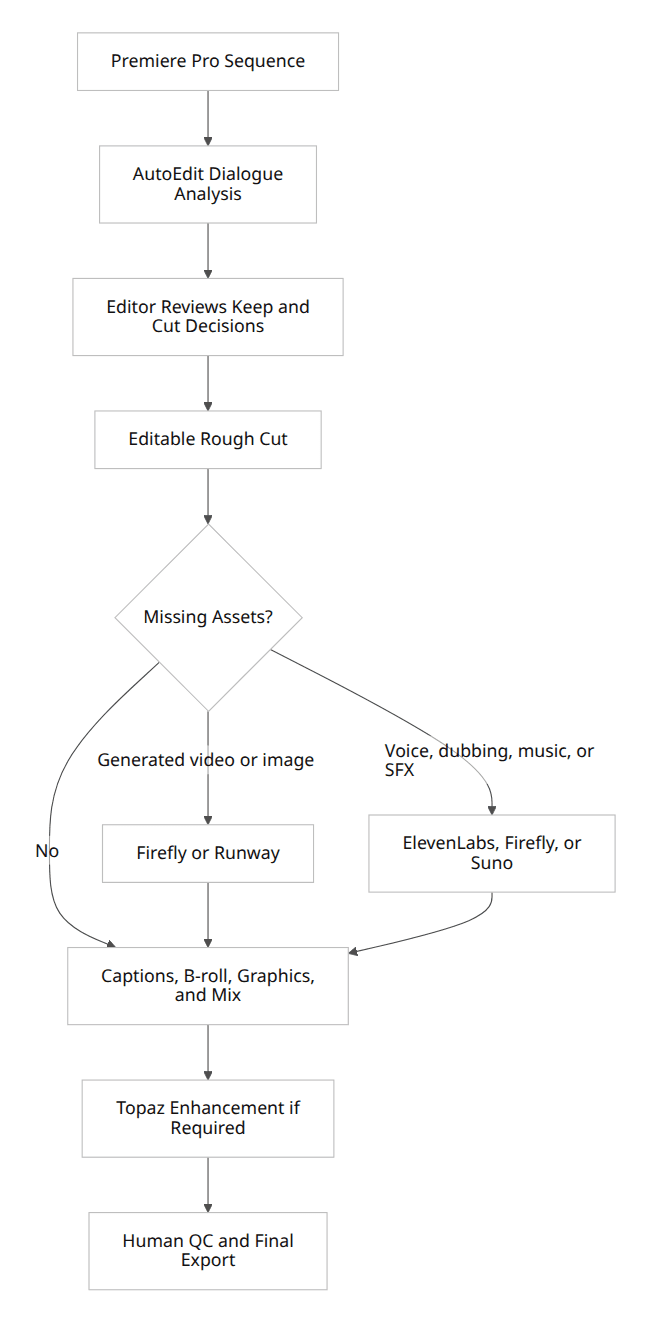
A Premiere-based creator workflow can remain particularly compact. AutoEdit performs the repetitive spoken-content pass; Firefly or Runway supplies missing visuals; ElevenLabs handles voice, dubbing, or sound effects; and Premiere remains the source of truth for timing, captions, graphics, mix, and export. AutoEdit’s official workflow retains editable Premiere cuts, while Adobe integrates its own transcript, masking, search, and generative tools into the broader ecosystem.
Premiere-based creator stack
For editors prioritizing privacy and local control, a Resolve-and-Topaz stack is more suitable. Resolve performs the edit, color, audio, transcription, masking, and finishing; Topaz performs local enhancement; cloud generators are introduced only for approved shots or audio. Resolve and Topaz both support substantial local desktop processing, whereas Runway, ElevenLabs, Firefly, ChatGPT, Claude, Descript, and Suno depend primarily on cloud services for their generative or reasoning functions.
The buying decision should therefore start with the bottleneck:
A productive stack rarely requires every product. A solo YouTuber might need Premiere, AutoEdit, and ElevenLabs. A documentary team might prefer Resolve, Claude, Topaz, and ElevenLabs. A commercial agency might use Premiere, Firefly, Runway, ElevenLabs, and a formal asset-rights register.
| Bottleneck | First purchase |
|---|---|
| Removing retakes and pauses from Premiere talking-head videos | AutoEdit Creator Mode |
| Full professional editing, color, audio, and finishing | DaVinci Resolve Studio or Premiere Pro |
| Creating missing visual shots | Runway or Adobe Firefly |
| Voiceover, cloning, dubbing, or multilingual audio | ElevenLabs |
| Editing directly from a transcript | Descript |
| Low-resolution, noisy, or unstable footage | Topaz Video |
| Vertical social output with minimal setup | CapCut |
| Scripts, research, treatments, thumbnails, and planning | ChatGPT |
| Long-transcript narrative analysis | Claude |
| Original music generation | Suno, ElevenLabs Music, or Firefly |
Tips
- Test on a duplicate sequence and keep the source media organized.
- Measure correction time as well as generation time.
Common mistakes
- Treating a first assembly as a finished edit.
- Skipping a complete editorial and technical review.
Try the workflow
Free tools for this article
Use the most relevant free tool for the task, then continue with the rest of your edit.
Video walkthroughs
Claude Replaced My Video Editor (for Content Creators)
How I Fully Automated My Video Editing with a Free Claude AI Premiere Plugin
Continue in Premiere Pro
Explore AutoEdit Creator Mode
Build an editable starting point, then keep creative control of the timeline.
Explore AutoEdit Creator ModeFrequently asked questions
What is the best AI tool for video editing overall?
Adobe Premiere Pro with Firefly is the best broad ecosystem because it combines a professional NLE with transcription, captions, search, masking, color, generative extension, image generation, video generation, sound effects, and soundtrack tools. DaVinci Resolve Studio is the stronger value when one-time pricing, local processing, color, and audio finishing matter more.
What is the best AI video editor for professional editors?
Premiere Pro and DaVinci Resolve remain the best primary editorial environments. Runway, AutoEdit, ElevenLabs, Descript, and Topaz are best understood as specialized accelerators around that primary timeline.
What is the best AI tool for Premiere Pro?
AutoEdit Creator Mode is the strongest specialist for talking-head rough cuts because Claude analyzes the transcript and creates editable cuts inside Premiere. Firefly is the broader Adobe-integrated choice for generative extension, images, video, audio, masking, and supporting assets.
What is the best AI tool for DaVinci Resolve editors?
Resolve Studio already includes many relevant AI tools, including transcription, text-based editing, masking, voice isolation, dialogue separation, music remixing, and other Neural Engine features. Runway, ElevenLabs, and Topaz are useful external complements when Resolve’s native generation or restoration tools do not cover the requirement.
What is the best free AI video editing tool?
DaVinci Resolve’s free edition is the strongest free professional NLE. AutoEdit also offers free Premiere utilities, Descript and CapCut have free tiers, and Runway, ElevenLabs, ChatGPT, Claude, and Suno provide limited free access. Free plans generally restrict AI credits, export quality, commercial rights, or advanced features.
What is the best AI tool for automatically removing bad takes?
AutoEdit is the most directly focused option for Premiere-based spoken content. It uses Claude to analyze transcript meaning, remove repeated or weak attempts, and create a reviewable first timeline. Descript, Premiere Text-Based Editing, AutoCut, and FireCut can also accelerate dialogue cleanup, but their workflows and reasoning models differ.
What is the best AI caption tool?
Descript is strong when captions are part of a transcript-first edit; AutoEdit is strong when captions follow a Premiere-based rough cut; Premiere provides native transcription and captions; CapCut is efficient for social styles; and ElevenLabs Studio combines captions with voice, dubbing, music, and sound effects.
What is the best AI voice generator for video?
ElevenLabs is the strongest overall choice because it offers multiple TTS models, expressive speech, multilingual output, voice cloning, speech-to-speech, dubbing, and API access. Eleven v3 emphasizes emotional delivery, Multilingual v2 emphasizes stable long-form quality, and Flash v2.5 emphasizes latency and cost.
What is the best AI transcription tool for editors?
ElevenLabs Scribe v2 is a strong standalone choice, supporting more than 90 languages, word-level timestamps, speaker diarization, and audio tagging. Descript is preferable when transcription must immediately drive the edit, while Premiere and Resolve are preferable when the transcript should stay attached to the primary NLE project.
What is the best AI tool for sound effects?
ElevenLabs and Adobe Firefly are the strongest broad options. ElevenLabs offers text-to-sound generation and API pricing, while Firefly can generate sound effects from text, voice direction, or references and export audio for use in a larger Adobe workflow. AutoEdit also includes readily accessible SFX utilities inside Premiere.
What is the best AI music generator for video editors?
Suno is the strongest dedicated music product in this comparison. ElevenLabs Music is better integrated with a broader voice and SFX platform, while Adobe Firefly Generate Soundtrack is attractive to Adobe users who want music alongside video and audio-generation workflows. Commercial rights depend on the plan and vendor terms.
What is the best AI tool for color grading?
DaVinci Resolve Studio remains the strongest choice for professional color work. Adobe Premiere’s newer Color Mode and AI-assisted masking make color more accessible to editors, but neither generative prompts nor one-click matching removes the need for monitoring, shot balancing, color management, and delivery checks.
What is the best AI tool for enhancing old or low-quality footage?
Topaz Video is the leading specialist in this group for denoising, restoration, deinterlacing, stabilization, frame interpolation, and upscaling. The result should be inspected at full resolution because enhancement models may invent textures or produce temporal artifacts.
Which AI video tools work offline?
DaVinci Resolve and Topaz Video support substantial local processing. Premiere itself is a desktop application, although many Firefly and generative-credit functions require online services. Most core functionality in Runway, ElevenLabs, ChatGPT, Claude, Suno, and Firefly depends on cloud processing; Descript also relies heavily on online services for transcription and AI features.
Which tools keep footage inside Premiere Pro?
AutoEdit works directly inside Premiere and applies editable timeline changes without requiring a separate browser-editing workflow. Adobe’s native AI features also remain in the Premiere ecosystem. External generated assets from Runway, ElevenLabs, Descript, Suno, or browser-based Firefly workflows normally need to be downloaded, imported, or otherwise transferred into the project.
Are cloud AI tools safe for confidential client footage?
Safety depends on the vendor, plan, account settings, retention controls, and contract. OpenAI states that business and API data are not used to train its models by default, while consumer ChatGPT content may be used unless the user opts out or uses Temporary Chat. Anthropic states that commercial product data is not used for training by default, while consumer improvement settings differ. Descript advertises enterprise controls such as training opt-outs and configurable retention. Editors should obtain written approval before uploading confidential, embargoed, legal, medical, or unreleased footage.
Is AI voice cloning legal?
Voice cloning is not governed by one universal rule. Consent, right-of-publicity law, privacy, fraud, contracts, advertising rules, platform policies, and jurisdiction all matter. The U.S. Copyright Office has specifically examined digital replicas of voices and appearances, while the FTC has emphasized that existing consumer-protection law still applies to AI-enabled deception and impersonation. ElevenLabs requires rights and consent for instant cloning and restricts Professional Voice Cloning to verified owners of the voice. Obtain explicit written consent and a clear commercial license before using another person’s voice.
Can I clone a celebrity’s voice for a commercial video?
That is a high-risk use and should not be done without explicit authorization and legal review. ElevenLabs blocks or restricts high-risk voices and requires verification for Professional Voice Cloning. Unauthorized commercial impersonation can implicate publicity, unfair-competition, consumer-protection, contractual, and platform rules even when the underlying words are original.
Which AI models do these tools use?
Runway publicly exposes Gen-4.5 and numerous routed models through its API. ElevenLabs identifies Eleven v3, Multilingual v2, Flash v2.5, Scribe v2, Eleven Music, and specialized speech-to-speech models. Adobe exposes Firefly Video and a growing selection of partner models in Firefly. AutoEdit identifies Claude as its reasoning provider but does not publicly name the exact Claude model on the reviewed feature pages. Descript’s 2026 updates introduced model selection for several generation and transcription workflows.
Does ChatGPT still include Sora video generation?
OpenAI discontinued the standalone Sora consumer experience on April 26, 2026, and announced that the corresponding API would shut down on September 24, 2026. Editors should not base a long-term production workflow on the retired Sora product. ChatGPT remains valuable for text, planning, analysis, images, documents, and connected workflows.
Can AI create a complete finished video without an editor?
AI can assemble a rough cut, generate missing assets, produce captions, synthesize narration, create music, and automate some finishing tasks. It cannot reliably guarantee narrative judgment, continuity, factual accuracy, brand compliance, release clearance, emotional pacing, audio standards, accessibility, or correct delivery specifications. AutoEdit itself describes its output as a starting timeline that the editor should review and finish.
Can multiple AI tools be used in the same project?
Yes. A practical workflow might use AutoEdit or Descript for the rough cut, Runway or Firefly for generated visuals, ElevenLabs for voice and SFX, Suno or Firefly for music, Topaz for enhancement, and Premiere or Resolve for final editorial control. The risks are duplicated subscriptions, inconsistent model aesthetics, version confusion, and unclear asset provenance, so teams should record prompts, source files, model names, account tiers, generation dates, and usage rights.
What should agencies document when delivering AI-assisted work?
A professional asset record should identify the tool, model where known, generation date, user or account, prompt or input reference, edits made after generation, consent for cloned voices or likenesses, applicable commercial plan, stock or music licenses, client approval, and any required AI disclosure. This is especially important for voice replicas, synthetic people, client trademarks, health or financial claims, and paid advertising.
Sources and verification
External product claims were checked against these first-party sources.
Adobe documentation for Generative Extend in Premiere Pro is the first-party source for the Premiere Pro and Firefly capabilities ranked first in this comparison.
The Blackmagic Design DaVinci Resolve page documents the Studio feature set, the one-time license, and the free edition described above.
The ElevenLabs model directory lists the speech, transcription, and music models attributed to ElevenLabs in this guide.
The Runway API changelog is the first-party record of the generative video models and credit rates cited for Runway.
The Topaz Video product page covers the restoration, interpolation, stabilization, and upscaling models referenced in this comparison.
The AutoEdit product site documents the Claude-powered Creator Mode workflow and pricing described in the AutoEdit entries above.