
AI Auto Video Editors vs Generators: A Premiere Pro Guide
A straight Premiere Pro guide for editors who want to compare AI categories and choose timeline automation for existing Premiere Pro footage, with the actual plugin, timeline, and cuts explained in plain English.

AI Auto Video Editors vs Generators: A Premiere Pro Guide
AI-assisted workflows inside Premiere ProMost people asking about ai auto video editor are not looking for another chatbot. They want to know whether Claude can put real cuts on a Premiere Pro timeline.
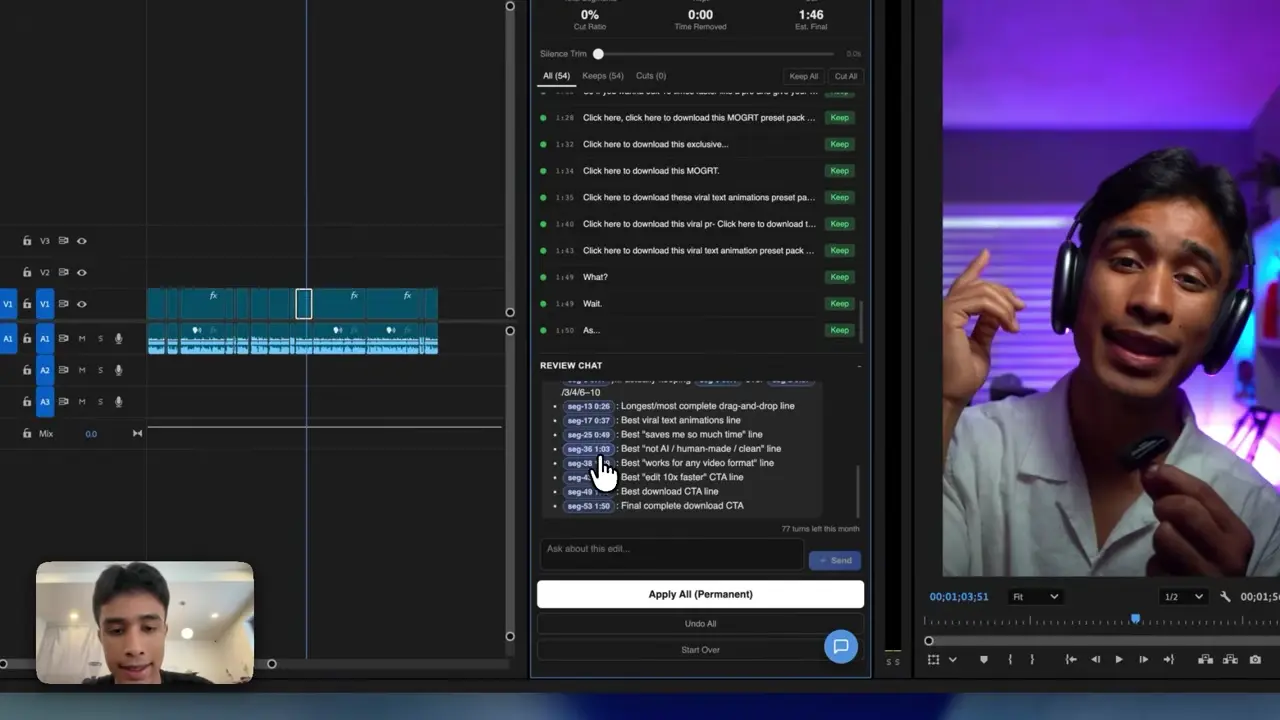
The easiest way to think about it is this: Claude is the handyman and Premiere Pro has the tools. AutoEdit brings Claude into Premiere, so it can read the transcript, help with the rough cut, and leave you with a normal timeline you can keep editing.
Quick Answer
For Premiere Pro editors, the best AI auto video editor is a tool that analyzes existing footage and returns an editable sequence. Generative AI creates new media, while browser auto editors rebuild projects elsewhere. AutoEdit focuses on the third category: AI-assisted rough cuts and repetitive editing workflows inside Premiere Pro.
What are the three main AI video editor categories?
1. Generative AI video tools
These create or transform footage from prompts. They are not primarily timeline automation.
2. Browser-based auto editors
These assemble content in a separate web workflow and often target simplified publishing.
3. AI timeline assistants
These analyze existing footage and help build an editable sequence inside software such as Premiere Pro.
Which kind is useful for a Premiere Pro editor?
If you already shot the video and started a Premiere Pro project, you probably need a timeline tool—not an app that generates a new clip. A timeline tool helps with the rough cut and leaves everything in Premiere for you to finish.
What does AutoEdit automate?
- Transcript-led creator rough cuts
- Silence and repeated-take cleanup
- Podcast and caption starting workflows
- Music-video performance and beat-based starting points
- Event-recap selects and first assemblies
What should buyers verify before choosing an auto AI editor?
- Which footage type the product supports
- Whether output stays in Premiere Pro
- Mac, Windows, and Premiere version compatibility
- Current plan, credits, trial, and update terms
- How much manual correction typical results require
What makes an AI auto editor useful?
It should save you from staring at raw footage, trimming the same dead air, syncing takes, or doing the first selects pass by hand. Most importantly, it should leave you with a normal timeline where you can change every cut.
What remains manual after AI auto editing?
The editor still controls final narrative, performance, pace, continuity, B-roll, graphics, sound, color, factual accuracy, client feedback, rights, and delivery.
Tips
- Work on a duplicate sequence.
- Ask for one clear edit at a time.
- Watch the cut and count how much you actually have to fix.
Common mistakes
- Treating the rough draft like a finished edit.
- Using transcript tools on clips that need visual selects.
- Exporting without watching every automatic cut.
Try the workflow
Free tools for this article
Use the most relevant free tool for the task, then continue with the rest of your edit.
Video walkthrough
How to Use Claude AI to Automatically Edit in Premiere Pro
Continue in Premiere Pro
Explore AutoEdit Creator Mode
Build an editable starting point, then keep creative control of the timeline.
Explore AutoEdit Creator ModeFrequently asked questions
What is an AI auto video editor?
An AI auto video editor uses analysis to automate defined selections, cuts, cleanup, or assembly tasks.
Is generative AI the same as automatic editing?
No. Generative AI creates media, while automatic editing organizes and changes existing footage.
What kind of AI editor is AutoEdit?
AutoEdit is an AI-assisted Premiere Pro plugin suite that creates editable rough cuts and workflow starting points.
Can an AI auto editor finish a video without review?
It may create a first pass, but professional review is still required for creative, technical, factual, and delivery decisions.
Should I choose a browser tool or Premiere Pro plugin?
Choose a Premiere Pro plugin when you need to preserve an existing project, timeline, media organization, and finishing workflow.
Sources and verification
External product claims were checked against these first-party sources.
How to Use Claude AI to Automatically Edit in Premiere Pro demonstrates Claude-powered editing inside a working Premiere Pro project.
AutoEdit Creator Mode provides the current Creator Mode download and product details.
Adobe Premiere Pro Text-Based Editing documents Adobe’s native transcript-based editing features.